Table of Contents
Digital platforms play one of the most important roles in designing the dealership operations, improving communication and enhancing customer service in today’s fast-paced automotive world. Among all such platforms one is the GM Global Connect, an integrated system developed by General Motors to connect dealers, suppliers and employees all over the world. So whether you’re managing inventory, tracking service data or accessing training resources, GM Global Connect serves as a centralized hub for all dealership operations. Moving forward this comprehensive guide will walk you through everything you need to know about the GM Global Connect login, its features, what all benefits it offers and how to use the Global Connect GM VSP portal effectively.
What Is GM Global Connect?
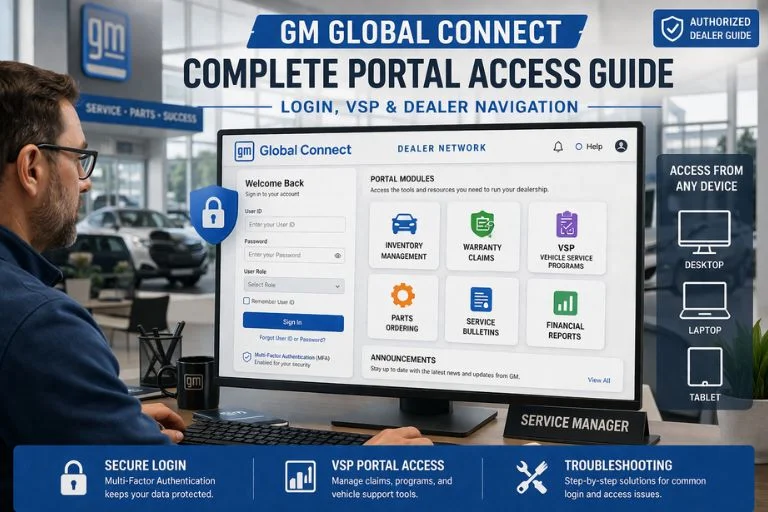
The GM Global Connect is a secured web-based portal developed by General Motors to centralize dealer operations under one roof. Serving as the backbone of GM’s dealer network it provides access to manage the vehicle inventory, ordering parts, submitting warranty claims with authorized dealers, buyers and suppliers. GM Global Connect brings several tools and features altogether in one place, making it easier for people to work. This helps save time, simplify task and improvise how work gets done across GM’s global Network.
Key Modules Available on the Platform
- Vehicle ordering and inventory tracking
- Warranty and goodwill claim submission
- Service technical bulletins and recall management
- Vehicle Service Programs (VSP) management
- Parts and accessories ordering
- Dealer financial reporting and analytics
- Training and certification resources
- Customer relationship tools
How to Access the GM Global Connect Login Page?
Getting started with GM Global Connect login is straightforward, but it does require prior authorization from your dealership’s system administrator. Here’s a step-by-step walkthrough:
- Navigate to the portal: Open a supported browser (Google Chrome or Microsoft Edge recommended) and go to the official GM dealer portal URL provided by your GM Network Administrator.
- Enter credentials: Input your assigned User ID and password on the GM Global Connect login screen.
- Multi-factor authentication (MFA): If MFA is enabled on your account, you’ll receive a verification code via email or SMS. Enter it to proceed.
- Select your role/module: After a successful GM Global Connect login, you will be directed to a personalized dashboard based on your role and dealership permissions.
- Session Management: Make sure you sign out after each session to protect dealership data, especially when using shared workstation.
VSP GM Global Connect: Understanding Vehicle Service Programs
One of the most critical features within the portal is the VSP module. VSP Global Connect refers to the Vehicle Service Programs section — a dedicated area where dealers can view, manage, and submit claims related to GM’s extended service plans, customer satisfaction programs, and technical campaigns. Accessing VSP logon Global Connect requires specific role permissions granted by a dealer principal or IT administrator. Once access is granted, authorized personnel can use the full VSP suite of tools.
VSP Module Feature Comparison
| Feature | Standard Dealer Access | VSP Authorized Access |
| Inventory management | ✓ Full access | ✓ Full access |
| Warranty claim submission | ✓ Full access | ✓ Full access |
| VSP claim management | ✗ Not available | ✓ Full access |
| Customer satisfaction programs | Limited view | ✓ Full access |
| Technical campaign tracking | ✓ Full access | ✓ Full access |
| Extended service plan reports | ✗ Not available | ✓ Full access |
| Parts ordering (VSP-specific) | ✗ Not available | ✓ Full access |
How to Complete VSP Login on GM Global Connect
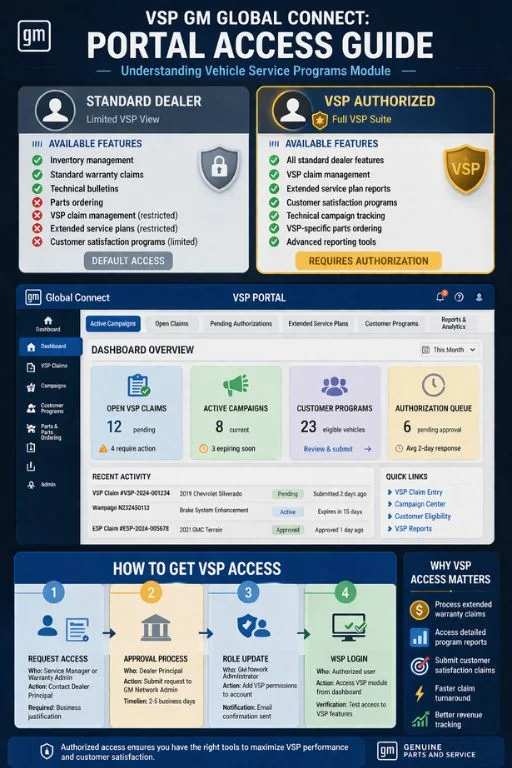
For service managers and warranty administrators who regularly handle extended service programs, the VSP login GM Global Connect process is slightly different from the standard dealer login:
- Complete the standard Global Connect login with your credentials.
- From the main dashboard, navigate to the “Service Programs” or “VSP” tab — location may vary slightly by portal version.
- Perform the VSP logon Global Connect by selecting your VSP profile or authorized role from the dropdown menu.
- Review active campaigns, open claims, and pending authorizations from the VSP dashboard.
- Submit or update claims using the integrated VSP form builder within the module.
If you encounter an error during VSP login Global Connect, the most common cause is an expired role permission or an inactive account. Contact your dealership’s GM Network Admin or GM’s Dealer Help Desk to resolve access issues promptly.
Common Login Issues and How to Fix Them
| Issue | Likely Cause | Resolution |
| Invalid credentials error | Incorrect username/password | Use the “Forgot Password” link or contact your admin |
| Account locked | Multiple failed login attempts | Contact GM Dealer Help Desk to unlock |
| MFA code not received | Outdated contact info on file | Update email/phone via your account profile |
| VSP module not visible | Insufficient role permissions | Request VSP access from dealer principal |
| Session timeout | Inactivity or browser issue | Clear cache, re-login, use a supported browser |
| Page not loading | Browser compatibility issue | Switch to Chrome or Edge; disable conflicting extensions |
Understanding Dealership Technology Integration
GM Global Connect represents the modern evolution of dealership management, similar to how specialized automotive platforms have transformed other aspects of vehicle ownership and service. When dealership services require parts beyond what’s available through GM’s network, quality aftermarket suppliers like Tagore Auto Parts provide reliable remanufactured engines and components to keep GM vehicles running efficiently.
Best Practices for Using GM Global Connect Effectively
Maximizing your productivity on Global Connect goes beyond simply logging in. Here are proven best practices for both individual users and dealership IT teams:
- Keep browser updated: Always use the latest version of Chrome or Edge for optimal portal performance and security.
- Enable MFA: Multi-factor authentication significantly reduces the risk of unauthorized access to sensitive dealership data.
- Manage roles regularly: Conduct quarterly reviews of user roles and permissions, particularly focusing on VSP-authorized accounts.
- Train new staff: Provide onboarding sessions that cover the Global Connect login process and module navigation before granting access.
- Bookmark the portal: Save the official Global Connect GM URL to avoid phishing sites that mimic the login page.
- Use GM’s help resources: The portal has built-in help documentation and a dedicated Dealer Help Desk for technical support.
Conclusion
The GM Global Connect is the indispensable hub of the daily operations for GM dealerships and authorized service professionals. From handling routine inventory updates to navigating the specialized VSP module, mastering both the standard Global Connect login and the VSP login GM Global Connect workflow is essential for operational efficiency and command.
By following these practices outlined in this guide suppliers can fully take advantage of what Global Connect offers. So whether you are a seasoned dealer or a newly onboarded service advisor, understanding the portal features will help you translate faster claim turnarounds, better customer outcomes and more streamlined dealership operations.
Frequently Asked Questions
What is the use of the GM Global Connect?
The GM Global Connect is a secured web-based portal used for managing inventory, submitting warranty claims, accessing service bulletins and handling vehicle service programs (VSP). This enables multiple dealer functions into a single, secure platform.
How do I perform a GM Global Connect login for the first time?
First-time users must receive login credentials from their dealership’s GM Network Administrator. Once you have your User ID and temporary password, visit the official portal URL, enter your credentials, and follow the prompts to set up your account and, if required, configure multi-factor authentication.
What is VSP GM Global Connect?
VSP GM Global Connect refers to the Vehicle Service Programs module within the portal. It allows authorized users to view, manage, and submit claims related to extended service plans, technical campaigns, and GM customer satisfaction programs.
How do I get VSP login GM Global Connect access?
VSP access must be requested through your dealership principal or GM Network Administrator. Once your role is updated to include VSP permissions, you can complete the VSP logon GM Global Connect process from within the main portal dashboard.
What should I do if my GM Global Connect account is locked?
In case if your account is locked due to multiple failed login attempts than you should directly contact the GM Dealer Help Desk directly, as they can verify your identity and restore access. Avoid creating a duplicate account as this can lead to compliance issue.
Is GM Global Connect accessible on mobile devices?
The portal is primarily designed for desktop use. While it may load on mobile browsers, full functionality especially for VSP modules and claims processing is best experienced on a desktop or laptop with a supported browser.